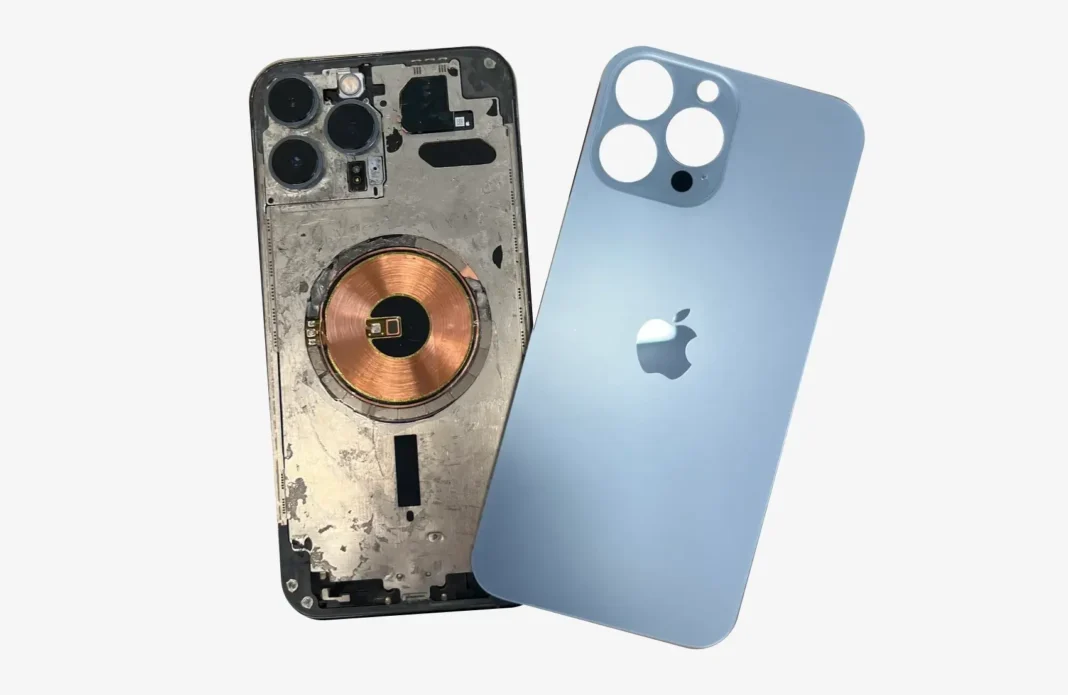

Cracked or shattered iPhone back glass is a common problem many users face, and repairing it at an authorized service center can often cost a small fortune. Fortunately, with the right tools, patience, and guidance, performing an iPhone back glass replacement at home is both feasible and cost-effective. This guide will take you through each step of the process, helping you save money while restoring your iPhone’s aesthetics and functionality.
Understanding the iPhone Back Glass
The back glass of an iPhone serves more than just a cosmetic purpose. It provides structural support, houses the wireless charging coil, and protects sensitive internal components. Over time, drops or impacts can crack the glass, leading to sharp edges, cosmetic damage, or even affecting your phone’s resale value. Knowing the importance of the back glass highlights why careful iPhone back glass replacement is necessary.
Tools and Materials Needed
Before starting the replacement, ensure you have all the necessary tools. Cutting corners here can lead to damaging your phone further:
- Heat gun or hairdryer
- Precision screwdriver set
- Plastic prying tools
- Suction cup
- Tweezers
- Adhesive strips or glue designed for iPhones
- Replacement iPhone back glass
Having a clean, organized workspace with proper lighting will also make the replacement process much smoother.
Preparing Your iPhone for Replacement
Start by powering off your iPhone completely to avoid any electrical hazards during the iPhone back glass replacement. Remove the SIM card tray to prevent damage. If your iPhone model has wireless charging, take note of the coil placement to avoid accidentally disturbing it.
Cleaning the back surface with a microfiber cloth ensures you have no dust or debris that could interfere with the new glass adhesion.
Heating and Loosening the Back Glass
Modern iPhones use strong adhesives to hold the back glass in place, so gentle heating is required to soften it. Use a heat gun or hairdryer on medium heat and evenly warm the back panel. Be cautious not to overheat as this can damage internal components.
Once the adhesive softens, use a suction cup near the edge of the back glass to create a slight gap. Carefully insert a plastic prying tool into the gap, gently working around the edges to loosen the adhesive. Patience is key here; rushing can crack the remaining glass.
Removing the Broken Glass Safely
As you lift the back glass, tiny shards may loosen. Wearing gloves is recommended to prevent cuts. Slowly continue to pry around the edges until the back panel separates completely from the iPhone frame. Remove any leftover adhesive residues with tweezers or adhesive remover to prepare a smooth surface for the new back glass.
Installing the New Back Glass
Take your replacement back glass and test fit it without adhesive first. This ensures proper alignment with the camera, buttons, and wireless charging components. Once satisfied, apply thin, even layers of adhesive or use pre-cut adhesive strips provided with many replacement kits.
Carefully position the new back glass on the iPhone, pressing firmly along the edges. Use gentle, even pressure to secure the glass, making sure no gaps remain. Allow the adhesive to cure according to manufacturer instructions for maximum durability.
Testing After Replacement
After the new back glass is installed, power on your iPhone to ensure it works correctly. Test features like the camera, wireless charging, and buttons to confirm nothing was displaced during the iPhone back glass replacement. Inspect the back glass for proper alignment and secure adhesion.
Tips to Avoid Common Mistakes
- Always work in a dust-free environment. Dust particles under the adhesive can compromise adhesion.
- Avoid using metal tools to pry the glass. Plastic prying tools reduce the risk of scratching or cracking.
- Take your time when loosening the old back glass. Speed increases the risk of additional damage.
- Keep the adhesive and tools away from children and pets.
Cost-Saving Advantages
DIY iPhone back glass replacement can save you hundreds compared to official repair services. Replacement kits are widely available online and often include all necessary tools and adhesive. This method allows you to maintain your iPhone’s original performance without paying steep labor fees.
Maintaining Your iPhone After Replacement
After replacing the back glass, consider using a protective case or tempered glass back protector to minimize the risk of future damage. Avoid exposing the phone to extreme temperatures, and handle it with care during daily use. Routine maintenance can extend the life of your iPhone and reduce the likelihood of repeated repairs.
When to Seek Professional Help
While DIY replacement is cost-effective, certain situations may require professional assistance:
- If the back glass is heavily shattered or has tiny fragments embedded near internal components.
- If the adhesive does not hold properly after multiple attempts.
- For iPhones with advanced features like Face ID sensors or complex wireless charging modules, professional handling ensures no accidental damage.
Even in these cases, many independent repair shops offer competitive rates compared to official service centers, helping you still save money without compromising quality.
Conclusion
Performing an iPhone back glass replacement at home is a practical solution for users looking to restore their device without breaking the bank. By following careful steps, using the proper tools, and exercising patience, you can achieve professional-looking results. This DIY approach not only saves money but also gives you a sense of accomplishment and confidence in handling minor repairs. With proper maintenance and protective measures, your iPhone can continue to look and function like new, keeping both your device and your wallet happy.
This step-by-step guide ensures you can confidently tackle a back glass replacement while preserving the quality and integrity of your iPhone.